GitHub - t8y2/dbx: 20 MB lightweight cross-platform database client for 90+ databases, including MySQL, PostgreSQL, SQLite, Redis, MongoDB,
90+ databases in 20 MB. Desktop, Docker, CLI, built-in AI assistant, and MCP Server. English | 前往中文版本 ❤️ Sponsors RainYun is a cloud service provider offering cloud servers, physical servers, game hosting, and developer-friendly infrastructure services. Visit
社区作者 · zZz
它解决什么问题
90+ databases in 20 MB. Desktop, Docker, CLI, built-in AI assistant, and MCP Server.
English | 前往中文版本
❤️ Sponsors
RainYun is a cloud service provider offering cloud servers, physical servers, game hosting, and developer-friendly infrastructure services. Visit RainYun
TrustAsia provides cloud-based code signing service for DBX, enabling trusted software through automated CI/CD builds. Visit TrustAsia
Jalapeño Cloud is an AI infrastructure and token compute platform, with an exclusive DBX entry offering free credits and top-up bonuses. Visit Jalapeño Cloud
UCloud is the first public cloud provider listed on China's STAR Market, with 28 global regions for cloud hosting, databases, and CDN; its AstraFlow platform offers one-click access to 200+ mainstream LLMs. Visit UCloud
HuaLongAI is a model API relay built for heavy AI developers, offering 100% official-source Codex and Claude models with transparent token-level billing, enterprise contracts, and invoicing. Visit HuaLongAI
Atlas Cloud gives developers one unified API for 400+ AI models across chat, image, video, and audio. Visit Atlas Cloud
Qiniu Cloud provides DBX with object storage, CDN, and other cloud infrastructure resources. Visit Qiniu Cloud
🤝 Partners
1Panel is a modern open-source Linux server management panel and lightweight AI management platform, offering an intuitive web interface for one-stop management of AI agents, local LLMs, websites, databases, containers, files, and more. Visit 1Panel
Easysearch is an enterprise-grade distributed search engine compatible with Elasticsearch APIs, combining full-text, vector, geospatial search, real-time analytics, and AI capabilities in one platform. Visit Easysearch
Why DBX?
🪶 20 MB, zero runtime bloat
No Java JRE. No Python venv. No bundled Chromium. DBX ships as a single small binary — download, install, connect. DBeaver needs Java; TablePlus is Freemium. DBX runs everywhere with nothing extra.
🤖 AI that lives in your editor
Highlight a table, describe what you want, get SQL back — no copy-paste between tools. Works with Claude, OpenAI, or local models via Ollama. Built-in safety checks review AI-generated SQL before it runs.
🔌 MCP: your databases, AI-ready
DBX speaks the Model Context Protocol. Claude Code, Cursor, Windsurf, and other AI coding agents can query your databases through connections you already set up. One config, everywhere.
🌐 Desktop + Docker + Web
Native app on macOS, Windows, and Linux. Self-host via Docker for team access. Web version for browser-only environments. Same feature set. Same connections.
Features
90+ Databases, One Tool
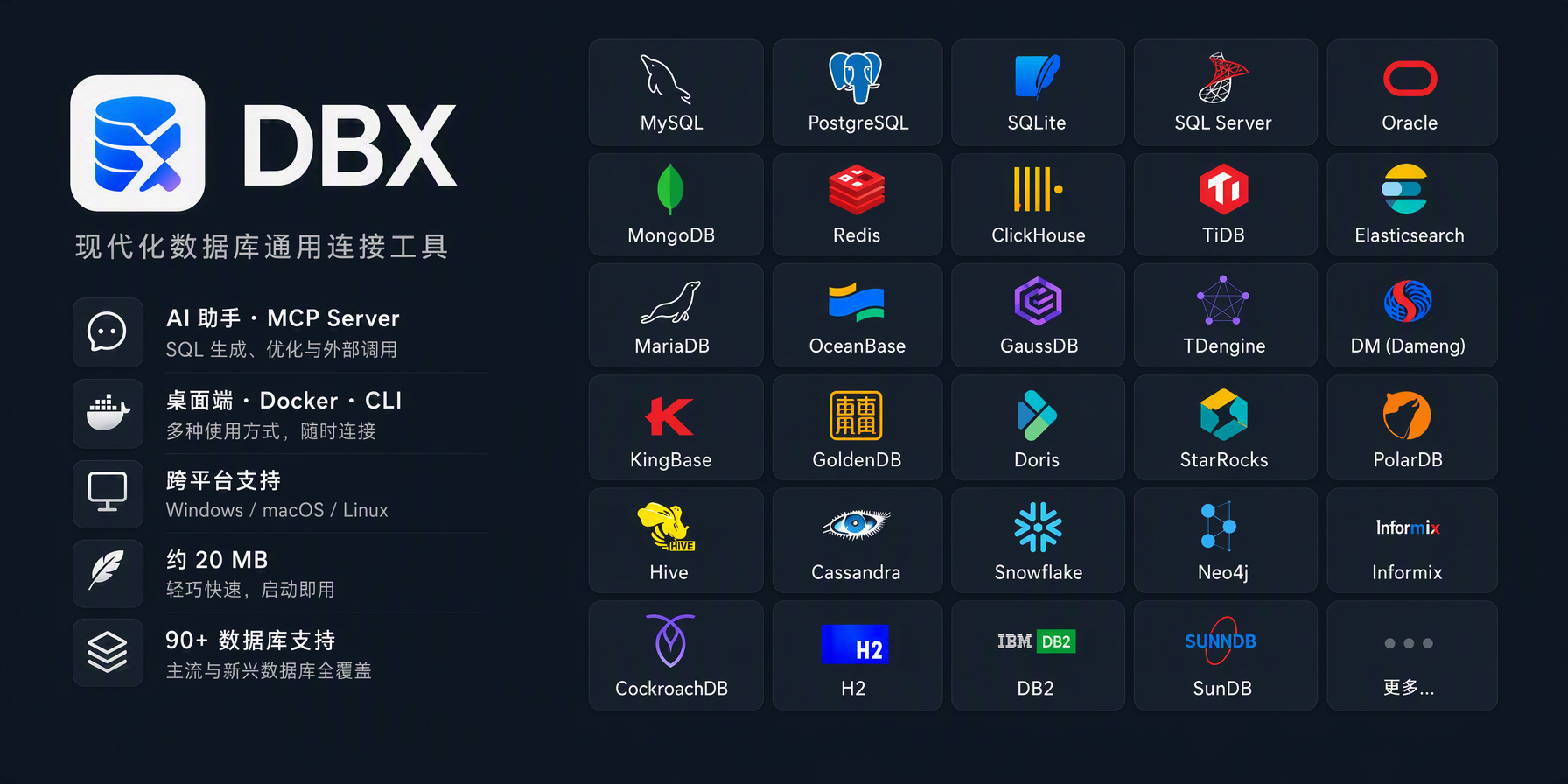
MySQL, PostgreSQL, SQLite, Cloudflare D1, Redis, MongoDB, DuckDB, ClickHouse, SQL Server, Oracle, Elasticsearch, Easysearch, Meilisearch, Qdrant, Milvus, Weaviate, MariaDB, TiDB, OceanBase, openGauss, GaussDB, KWDB, KingbaseES, Vastbase, GoldenDB, Doris, SelectDB, StarRocks, Manticore Search, Redshift, DM, TDengine, XuguDB, CockroachDB, Access, HighGo, UXDB, Dolt, and more.
Agent-based profiles extend DBX to H2, Snowflake, Trino, PrestoSQL, Hive, DB2, Informix, Neo4j, Cassandra, BigQuery, Cloud Spanner, Kylin, SunDB, JDBCX, and custom JDBC connections.
New native and agent-driven drivers also cover Databricks, SAP HANA, Teradata, Vertica, Firebird, Exasol, YashanDB, GBase 8a/8s, Databend, RQLite, Turso, InfluxDB, QuestDB, IoTDB, etcd, ZooKeeper, Nacos, Consul KV, IRIS, and more.
Message queue admin is also available for Pulsar, Kafka, and RocketMQ. All in a single ~20 MB app. No bundled Chromium.
Query Editor
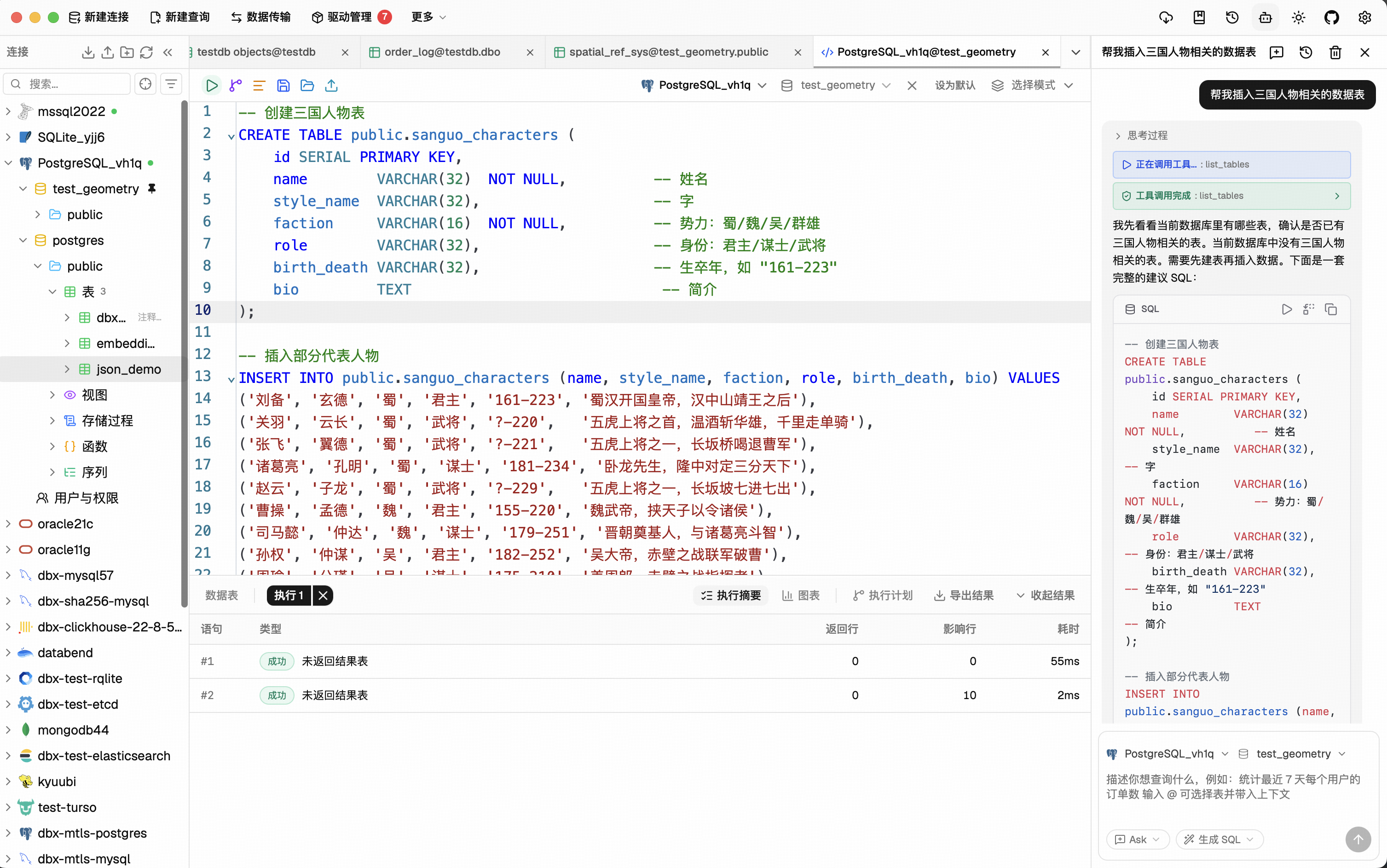
CodeMirror 6 with SQL syntax highlighting, metadata-aware autocomplete, Cmd+Enter execution, selected SQL execution, SQL formatting, diagnostics, and 9 editor themes. Persistent query history, saved SQL snippets, tab restore, and SQL file execution keep repeat work close at hand.
AI SQL Assistant
Describe what you want in plain language — get SQL back. DBX can explain queries, optimize SQL, fix errors, and run AI-generated SQL through built-in safety checks. Works with Claude, OpenAI, local models, or any OpenAI-compatible endpoint.
Data Grid
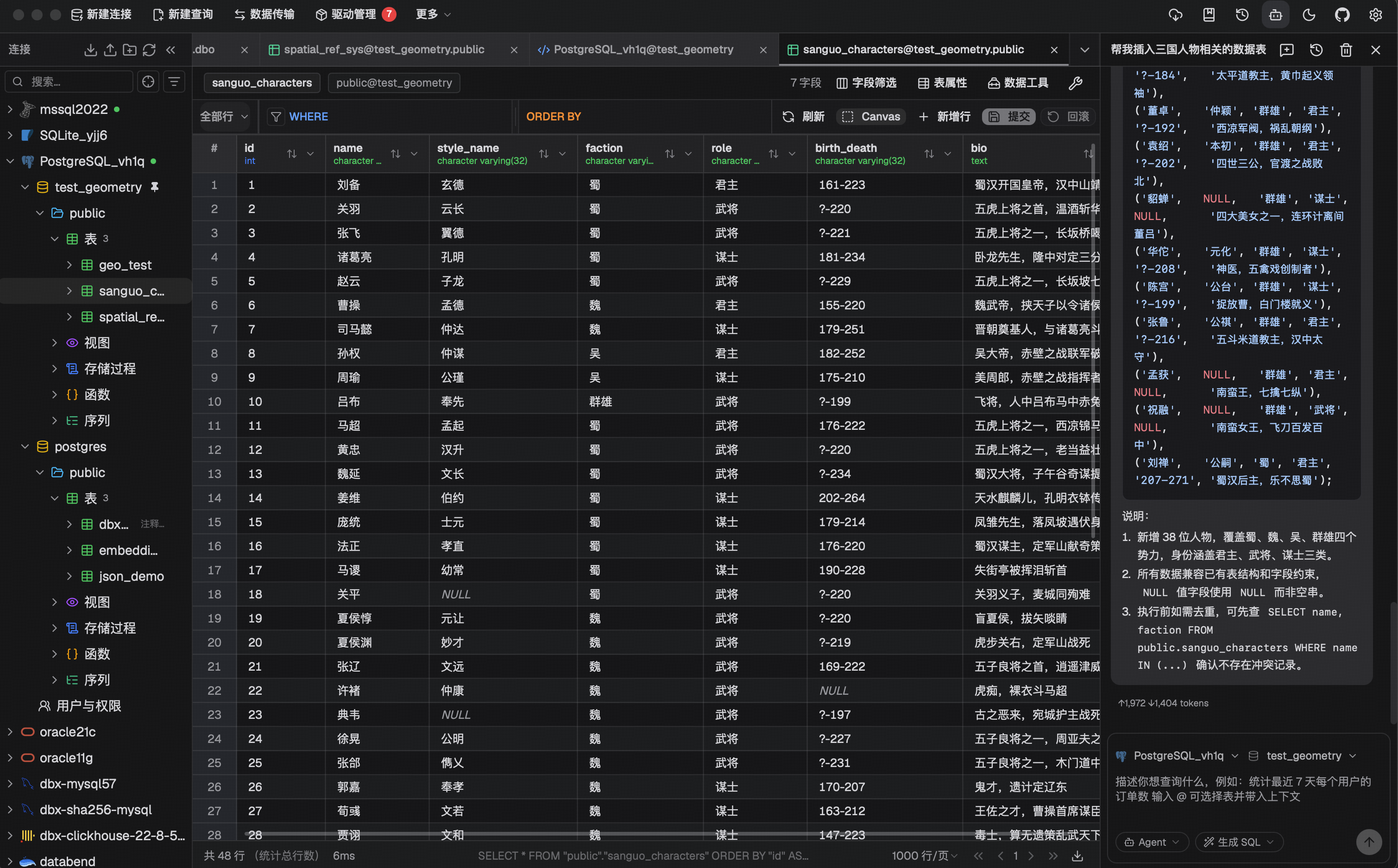
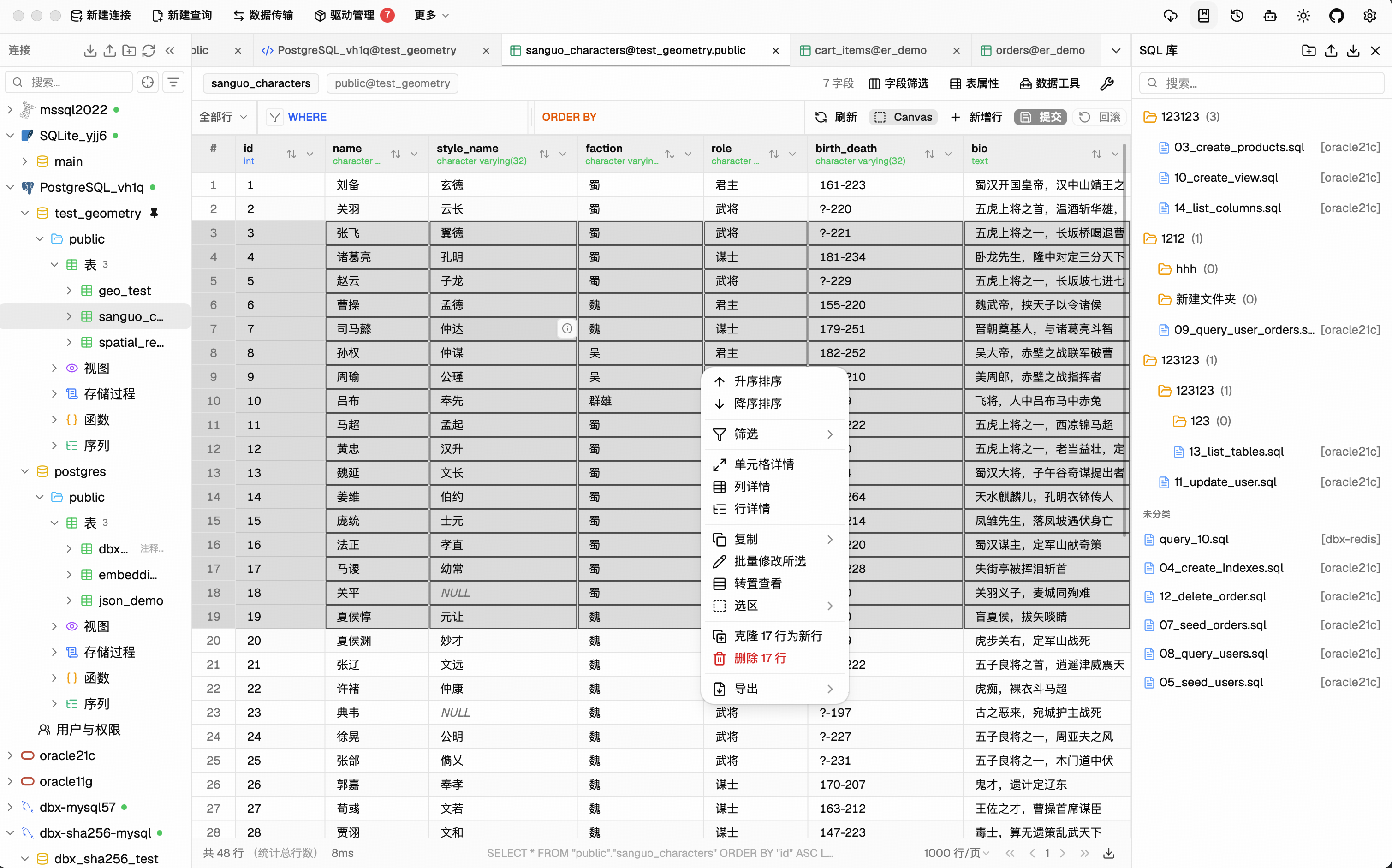
Virtual-scrolled table that handles large result sets.
Inline editing, SQL preview before save, WHERE / ORDER BY controls, DataGrip-style filters, LIKE / NOT LIKE context filters, sorting, full-text search, pagination, column resize, auto-fit, row numbers, zebra stripes, and full cell details.
Export or copy as CSV, JSON, Markdown, XLSX, or INSERT statements.
Schema Tools
- Schema browser — databases, schemas, tables, columns, indexes, foreign keys, triggers, with sidebar search & pin
- Object browser — grouped procedures, functions, views, and source editing where supported
- Table structure editor — reviewable column and index changes for supported engines
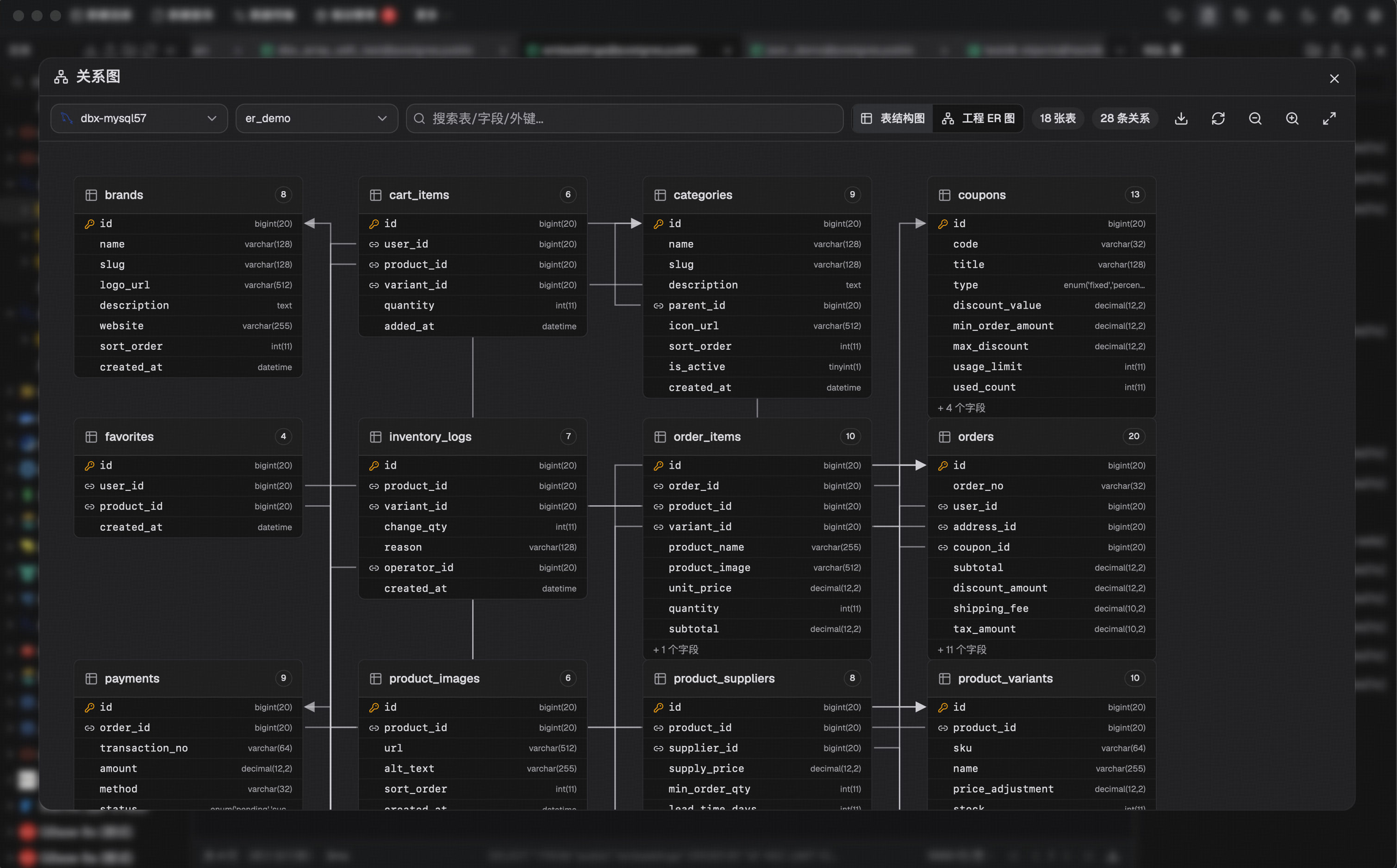
- ER diagram — visualize table relationships
- Schema diff — compare structures across connections
- Explain plan — visual query execution plan
- Field lineage — column-level lineage analysis
- Database search — find objects across large schemas
Data Operations
- Table import — CSV, Excel
- Data transfer — migrate between databases
- Database export — full database dump
- Data compare — compare table data and review synchronization output
- SQL file execution — run .sql files directly
- File preview — drag & drop Parquet, CSV, JSON to preview instantly (powered by DuckDB)
- Connection import — bring connection profiles from DBeaver or Navicat
Specialized Browsers
- Redis — key pattern search, batch key operations, command runner, TTL editing, and all data types (String, Hash, List, Set, ZSet, Stream)
- MongoDB — document CRUD with pagination, Atlas & replica set URL connection
Safety & Connectivity
SSH tunnel (key & password) · database and AI proxy settings · auto-reconnect on connection loss · confirmation dialogs for destructive operations · encrypted config export/import · color-coded connections · driver store and optional JDBC plugin
Polished UI
Dark mode with native title bar sync · 9 editor themes · English, 简体中文 & Español · layout preferences · built-in auto-update
AI Agent Integration (MCP)
DBX provides a separate Rust-powered MCP server that lets AI coding agents query databases using connections configured in DBX. The MCP server is distributed independently from the desktop application, so installing DBX does not automatically install the MCP executable.
npx @dbx-app/mcp-serverAdd to your .mcp.json :
{ "mcpServers" : { "dbx" : { "command" : " npx " , "args" : [ " -y " , " @dbx-app/mcp-server " ] } } }
Manage the connection allowlist and the Read only , Data read/write , and Full access modes in DBX Settings → MCP . The machine-readable values remain read_only , safe_write , and high_risk_write ; client configs do not need permission or connection-scope environment variables.
For upgrade compatibility, an existing DBX_MCP_ALLOW_WRITES=0 (or false ) remains a read-only restriction only until a central MCP policy is saved for the first time; it can never enable writes or override a saved policy.
Windows portable builds need DBX_DATA_DIR in the MCP config, pointing to the data directory next to DBX.exe (the folder that contains dbx.db ).
For DBX Web or Docker deployments, point the MCP server at the Web backend API. If the Web login page requires a password, set DBX_WEB_PASSWORD to the same password used there:
{ "mcpServers" : { "dbx" : { "command" : " npx " , "args" : [ " -y " , " @dbx-app/mcp-server " ], "env" : { "DBX_WEB_URL" : " http://localhost:4224 " , "DBX_WEB_PASSWORD" : " your-web-login-password " } } } }
Works with Claude Code, Cursor, Windsurf, and any MCP-compatible agent. Supports listing connections, browsing tables, executing SQL, and opening tables directly in DBX's UI.
Precompiled native binaries are also published for macOS, Linux, and Windows in package releases . They run without Node.js and are suitable for offline or server environments. The npm installation uses the same Rust binary through a small Node.js launcher.
DBX also provides a dedicated CLI package for terminal, script, and Codex workflows:
npm install -g @dbx-app/clior via Homebrew
brew tap t8y2/tap && brew install dbx-clidbx connections list --json dbx query local " select 1 " --json
See the MCP server README and CLI README for details.
Install
Download the latest release from the Releases page.
Homebrew (macOS):
brew install --cask dbxScoop (Windows):scoop bucket add dbx https://github.com/t8y2/scoop-bucketscoop install dbxWinGet (Windows):winget install t8y2.dbxFlatpak (Linux):
flatpak remote-add --if-not-exists flatpark https://dl.flatpark.org/flatpark.flatpakrepo flatpak install flatpark com.dbxio.dbx
Updates then arrive through the regular flatpak update . See the DBX page on FlatPark for details.
Self-Hosted (Docker)
DBX provides a web version that can be deployed via Docker. The examples use the latest tag to pull the current release.
docker run -d --pull=always --name dbx -p 4224:4224 -v dbx-data:/app/data t8y2/dbx:latestThis uses the cross-platform dbx-data named volume. Users in China can use the CNB image, docker.cnb.cool/dbxio.com/dbx:latest , for faster pulls.
For Docker Compose, deploy/docker-compose.yml remains the source-build configuration. To deploy a published image, use deploy/docker-compose.release.yml :
docker compose -f deploy/docker-compose.release.yml up -dservices : dbx : image : t8y2/dbx:latest
For faster pulls in China, use the CNB image instead:
image: docker.cnb.cool/dbxio.com/dbx:latest
pull_policy : always ports :
volumes :
restart : unless-stopped
- " 4224:4224 "
- dbx-data:/app/data
volumes : dbx-data :
Open http://localhost:4224 in your browser. Multi-arch images (amd64 / arm64) are available.
To publish DBX under a reverse-proxy context path such as /dbx , set the runtime base path and proxy the same prefix to the container:
environment :
DBX_PUBLIC_BASE_PATH=/dbxWhen building the frontend yourself with an absolute asset base, set
VITE_DBX_BASE_PATH=/dbx/ before pnpm build .Getting Started
Prerequisites
- Node.js >= 18
pnpm- Rust >= 1.88
System Dependencies
macOS:
No additional dependencies required.
Linux (Ubuntu/Debian):
sudo apt-get install -y libwebkit2gtk-4.1-dev libgtk-3-dev libappindicator3-dev librsvg2-dev patchelf libssl-dev
NIXOS/NIX :
See README-NIX.md
Windows:
No additional dependencies required.
Development
makemake installs root dependencies when needed and starts the local Tauri desktop development environment.Development builds can run alongside an installed DBX instance and share its local data, including connections and history. Avoid changing the same connection or global setting in both windows at once.
Tip DuckDB compilation takes a while. If you're not working on DuckDB features, skip it to speed up local builds:
Fast checks (skip DuckDB)
make cargo-check-fastmake cargo-test-fastTauri dev without DuckDB
make dev-fastThe --no-default-features flag only affects local development. Release builds ( pnpm tauri build ) always include DuckDB.
Web version:
make dev-web # frontendmake dev-backend # backendDocumentation site:
make docsThe official DBX documentation site lives in docs/ . If you want to improve the website content or documentation pages, edit the files under docs/ and run make docs to preview the site locally.
For clean, reproducible local database instances, use the versioned Docker Compose recipes under deploy/database/ :
make db-listmake db-verify [email protected]JDBC agent driver development projects live in agents/ :
cd agents./gradlew testBuild artifacts from agents/drivers/<db-type>/build/libs/ are picked up by local driver install flows when available.
Build
make packageThe installer will be in src-tauri/target/release/bundle/ .
Tech Stack
Layer Technology
Framework Tauri 2
Frontend Vue 3 + TypeScript
UI shadcn-vue + Tailwind CSS
Editor CodeMirror 6
Backend Rust + sqlx / tiberius / redis-rs / mongodb
Documentation
- Official docs — feature guides and tutorials
- Database Test Lab — local database recipes for development and verification
- Contributing — how to pick up issues and open PRs
- Web API reference — HTTP API for Docker/Web deployments
- Examples — CLI, MCP, Docker, and API samples
Support DBX
DBX is free and open source, but ongoing maintenance, database compatibility testing, infrastructure, and release work require sustained time and resources.
- Support DBX — voluntary donations via WeChat or Alipay
- Sponsors & Partners — sponsorship, infrastructure, tools, and community collaboration
Contributors
Community
Star History
License
Apache-2.0
— 本文由 AI 根据公开来源辅助整理,命令、版本与许可证请在使用前到原始页面复核。
安装 / 开始使用
No Java JRE. No Python venv. No bundled Chromium. DBX ships as a single small binary — download, install, connect. DBeaver needs Java; TablePlus is Freemium. DBX runs everywhere with nothing extra.
🤖 AI that lives in your editor Highlight a table, describe what you want, get SQL back — no copy-paste between tools. Works with Claude, OpenAI, or local models via Ollama. Built-in safety checks review AI-generated SQL before it runs.
🔌 MCP: your databases, AI-ready DBX speaks the Model Context Protocol. Claude Code, Cursor, Windsurf, and other AI coding agents can query your databases through connections you already set up. One config, everywhere.
🌐 Desktop + Docker + Web Native app on macOS, Windows, and Linux. Self-host via Docker for team access. Web version for browser-only environments. Same feature set. Same connections.
Features 90+ Databases, One Tool MySQL, PostgreSQL, SQLite, Cloudflare D1, Redis, MongoDB, DuckDB, ClickHouse, SQL Server, Oracle, Elasticsearch, Easysearch, Meilisearch, Qdrant, Milvus, Weaviate, MariaDB, TiDB, OceanBase, openGauss, GaussDB, KWDB, KingbaseES, Vastbase, GoldenDB, Doris, SelectDB, StarRocks, Manticore Search, Redshift, DM, TDengine, XuguDB, CockroachDB, Access, HighGo, UXDB, Dolt, and more.
Agent-based profiles extend DBX to H2, Snowflake, Trino, PrestoSQL, Hive, DB2, Informix, Neo4j, Cassandra, BigQuery, Cloud Spanner, Kylin, SunDB, JDBCX, and custom JDBC connections.
New native and agent-driven drivers also cover Databricks, SAP HANA, Teradata, Vertica, Firebird, Exasol, YashanDB, GBase 8a/8s, Databend, RQLite, Turso, InfluxDB, QuestDB, IoTDB, etcd, ZooKeeper, Nacos, Consul KV, IRIS, and more.
Message queue admin is also available for Pulsar, Kafka, and RocketMQ. All in a single ~20 MB app. No bundled Chromium.
Query Editor CodeMirror 6 with SQL syntax highlighting, metadata-aware autocomplete, Cmd+Enter execution, selected SQL execution, SQL formatting, diagnostics, and 9 editor themes.
Persistent query history, saved SQL snippets, tab restore, and SQL file execution keep repeat work close at hand. AI SQL Assistant Describe what you want in plain language — get SQL back.
DBX can explain queries, optimize SQL, fix errors, and run AI-generated SQL through built-in safety checks. Works with Claude, OpenAI, local models, or any OpenAI-compatible endpoint. Data Grid Virtual-scrolled table that handles large result sets.
Inline editing, SQL preview before save, WHERE / ORDER BY controls, DataGrip-style filters, LIKE / NOT LIKE context filters, sorting, full-text search, pagination, column resize, auto-fit, row numbers, zebra stripes, and full cell details.
Export or copy as CSV, JSON, Markdown, XLSX, or INSERT statements. Schema Tools
Data Operations
Specialized Browsers
Safety & Connectivity SSH tunnel (key & password) · database and AI proxy settings · auto-reconnect on connection loss · confirmation dialogs for destructive operations · encrypted config export/import · color-coded connections · driver store and optional JDBC plugin Polished UI Dark mode with native title bar sync · 9 editor themes · English, 简体中文 & Español · layout preferences · built-in auto-update AI Agent Integration (MCP) DBX provides a separate Rust-powered MCP server that lets AI coding agents query databases using connections configured in DBX.
The MCP server is distributed independently from the desktop application, so installing DBX does not automatically install the MCP executable.
- Schema browser — databases, schemas, tables, columns, indexes, foreign keys, triggers, with sidebar search & pin
- Object browser — grouped procedures, functions, views, and source editing where supported
- Table structure editor — reviewable column and index changes for supported engines
- ER diagram — visualize table relationships
- Schema diff — compare structures across connections
- Explain plan — visual query execution plan
- Field lineage — column-level lineage analysis
- Database search — find objects across large schemas
- Table import — CSV, Excel
- Data transfer — migrate between databases
- Database export — full database dump
- Data compare — compare table data and review synchronization output
- SQL file execution — run .sql files directly
- File preview — drag & drop Parquet, CSV, JSON to preview instantly (powered by DuckDB)
- Connection import — bring connection profiles from DBeaver or Navicat
- Redis — key pattern search, batch key operations, command runner, TTL editing, and all data types (String, Hash, List, Set, ZSet, Stream)
- MongoDB — document CRUD with pagination, Atlas & replica set URL connection
npx @dbx-app/mcp-serverAdd to your .mcp.json : { "mcpServers" : { "dbx" : { "command" : " npx " , "args" : [ " -y " , " @dbx-app/mcp-server " ] } } } Manage the connection allowlist and the Read only , Data read/write , and Full access modes in DBX Settings → MCP .
The machine-readable values remain read_only , safe_write , and high_risk_write ; client configs do not need permission or connection-scope environment variables.
For upgrade compatibility, an existing DBX_MCP_ALLOW_WRITES=0 (or false ) remains a read-only restriction only until a central MCP policy is saved for the first time; it can never enable writes or override a saved policy.
Windows portable builds need DBX_DATA_DIR in the MCP config, pointing to the data directory next to DBX.exe (the folder that contains dbx.db ). For DBX Web or Docker deployments, point the MCP server at the Web backend API.
If the Web login page requires a password, set DBX_WEB_PASSWORD to the same password used there: { "mcpServers" : { "dbx" : { "command" : " npx " , "args" : [ " -y " , " @dbx-app/mcp-server " ], "env" : { "DBX_WEB_URL" : " http://localhost:4224 " , "DBX_WEB_PASSWORD" : " your-web-login-password " } } } } Works with Claude Code, Cursor, Windsurf, and any MCP-compatible agent.
Supports listing connections, browsing tables, executing SQL, and opening tables directly in DBX's UI. Precompiled native binaries are also published for macOS, Linux, and Windows in package releases . They run without Node.
js and are suitable for offline or server environments. The npm installation uses the same Rust binary through a small Node.js launcher. DBX also provides a dedicated CLI package for terminal, script, and Codex workflows:
npm install -g @dbx-app/clior via Homebrew
brew tap t8y2/tap && brew install dbx-clidbx connections list --json dbx query local " select 1 " --json See the MCP server README and CLI README for details. Install Download the latest release from the Releases page. Homebrew (macOS):
brew install --cask dbxScoop (Windows):scoop bucket add dbx https://github.com/t8y2/scoop-bucketscoop install dbxWinGet (Windows):winget install t8y2.dbxFlatpak (Linux): flatpak remote-add --if-not-exists flatpark https://dl.flatpark.org/flatpark.flatpakrepo flatpak install flatpark com.dbxio.dbx Updates then arrive through the regular flatpak update . See the DBX page on FlatPark for details.
Self-Hosted (Docker) DBX provides a web version that can be deployed via Docker. The examples use the latest tag to pull the current release.